
Magica
AI Assistant AppsProductivity
2.81.20K Reviews
- Version
- 1.0.49
- Installs
- 100.00K
- Age Rating
- Everyone
Screenshots



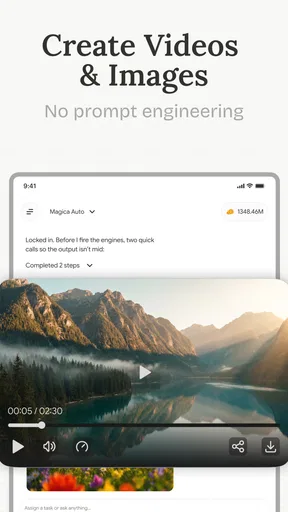
Our Review of Magica
 Analysis by Appyee
I found it helpful to think of Galaxy.ai less as a magic productivity fix and more as an attempt to put an AI assistant between me and the small, scattered jobs that interrupt a day. That distinction matters: an assistant is most useful when it reduces the effort of capturing and sorting a task, not when I expect it to take over every tool I already use. As a free productivity app from GALAXYAI INC, it has an appealingly low barrier to trying that style of workflow, though its in-app purchases make it worth checking the cost of any paid options before building a routine around them.
Why a central assistant can change the routine
The useful idea behind Galaxy.ai is having one place to express what I need to do, rather than deciding first which app or menu should hold it. That can be a meaningful shift for people whose reminders live in several places: a note to themselves, a calendar entry, and a message they meant to answer later. If the assistant handles a request cleanly, I spend less time choosing a destination and more time acting on the reminder.
That convenience has a boundary. A central hub only helps if it fits the tools and habits I already rely on. I would not move an entire work system into a new assistant on day one. I’d start with a few low-risk reminders, then see whether the app reliably captures them and whether its suggestions genuinely reduce effort rather than adding another inbox to check.
A practical way to test it
For a first run, I’d choose tasks with clear wording and a near-term outcome: remember to call someone, prepare an item before leaving, or follow up on a message. That gives me a simple way to judge whether voice input or task entry is convenient in real conditions. I’d also check the result after submitting a request; a quick glance at the saved task is a sensible habit whenever an assistant interprets natural language.
A useful second test is to separate capture from planning. During a busy stretch, I can add tasks as they occur, then review them later and decide what deserves attention first. This avoids turning every passing thought into an immediate interruption. It also shows whether Galaxy.ai’s organization tools suit the way I prioritize, rather than assuming that a polished interface automatically means a good fit for my personal system.
Where I would keep a backup
I’d treat any AI-generated suggestion as a prompt to consider, not as an instruction I must follow. A suggestion can be sensible and still miss a deadline, a personal preference, or the context behind a task. For anything important, I would verify the details and keep the authoritative record in the calendar, email, or workplace system that other people already use. That cautious approach preserves the convenience of an assistant without making it the only place I trust.
Privacy deserves the same practical attention. The original review describes privacy controls, but I would still look through the settings myself before entering sensitive notes or personal details. A reminder to buy groceries is different from confidential work information. Keeping entries appropriately general is a useful habit with any assistant that processes personal requests, especially when I have not yet decided how much I want it to know.
What it replaces—and what it does not
Compared with a basic checklist app, an AI assistant can feel more natural when I want to phrase a task instead of filling out several fields. A conventional list may still be better when I need a dependable, transparent sequence of items and no interpretation. Likewise, a dedicated calendar remains the clearer choice for time-specific appointments, while email is still the source of truth for correspondence. Galaxy.ai makes the most sense as a layer for capturing and organizing everyday intentions, not necessarily as a replacement for each specialized service.
It is also worth distinguishing convenience from automation. The original review describes integrations and proactive suggestions, but I would test any connection that matters to my workflow rather than assume every service behaves exactly as I expect. Before relying on a proposed sync, I’d confirm what appears on each side and whether changes stay consistent. That small check can prevent duplicate tasks or misplaced confidence when several tools are involved.
A realistic day with it
Imagine I’m leaving home, notice that I need to call a family member, and remember a work follow-up while my hands are occupied. A quick voice request could be easier than unlocking the phone, opening a list, and typing each item. Later, when I have a quiet moment, I can review what I captured, add any missing context, and decide what needs attention first. The benefit is not that the app completes the calls or work; it is that fewer intentions have to stay in my head.
For that routine to work, I’d keep requests short and specific. “Call Mom” is easy to recognize, while a vague note such as “sort things out later” may not be useful when I return to it. If a task depends on a date or a person, I would include that detail and check that it was understood. This is a small but important trade-off: speaking can be faster than typing, yet clear wording and a brief review still matter.
Who is likely to get the most from it
I can see the strongest fit for someone who regularly forgets small follow-ups, prefers talking to typing, and is willing to review an assistant’s work rather than trusting it blindly. It may also suit a person who wants to experiment with AI-supported organization without paying upfront. The app is free to start, is rated for Everyone, and has an average rating of 4.3 from around 1,600 ratings, so there is a meaningful pool of user feedback to consider alongside your own trial.
On the other hand, I would skip it if I need a strict, shared project-management system with clearly defined responsibilities, or if I already have a checklist and calendar routine that works smoothly. People who avoid voice input, prefer fully manual organization, or do not want another place to review may gain little. An assistant should remove friction; if using it means maintaining a second system, a simpler tool is probably the better choice.
Version, cost, and a sensible trial
Galaxy.ai was released on March 18, 2025, and its current version is 1.0.36. It runs on Android 7.0 or later, making it accessible to many older Android devices. The app has more than 100,000 installs, but broad adoption does not tell me whether it will suit my particular routine; a short personal test is still more useful than popularity alone.
Although the app is free, in-app purchases range from $4.99 to $399.99 per item. I’d explore the everyday workflow before considering a purchase and check what a paid option actually changes at the point where it is offered. That approach is especially sensible for a productivity app: the value should come from a repeated improvement in my day, not from the promise that more features must mean better organization.
My practical recommendation is to try it with a handful of ordinary reminders, review the captured tasks, and compare the effort with the list or calendar you already use. If Galaxy.ai makes those small jobs easier without creating extra checking, it may earn a place in your routine. If it does not, there is no need to force a new system into a workflow that already works.
Have you ever wished for an app that feels like it’s lightyears ahead in terms of technology? Well, let me introduce you to Galaxy.ai. I recently spent some quality time exploring this little gem, and let me tell you, it's a game-changer in the app world.
What is Galaxy.ai?
So, what exactly is Galaxy.ai? In simple terms, it’s an AI-driven personal assistant designed to make your life a tad easier. Whether you're an Android or iOS user, this app promises to streamline your tasks and boost productivity, all while being super user-friendly. But does it deliver on its promises? Let's dive in.
First Impressions Matter
Firing up the app for the first time, I was greeted with a sleek, modern interface. It's intuitive and doesn’t overwhelm you with options. I appreciate that; simplicity is key when you’re trying to get things done without a fuss. Navigating through the menus felt like a breeze, thanks to its responsive design and clear layout.
Features That Stand Out
One of the standout features of Galaxy.ai is its powerful task management capabilities. You can create, organize, and prioritize your tasks effortlessly. I found the voice command feature incredibly useful, especially when my hands were tied up. Just a quick "Hey Galaxy, remind me to call Mom," and boom, it’s done.
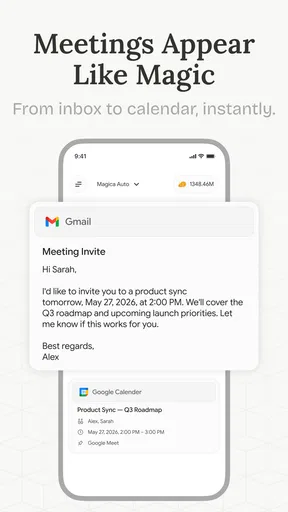
Another cool aspect is the app's ability to integrate with other tools and services. From syncing your calendar to managing emails, Galaxy.ai acts as a central hub for all your digital needs. It even learns from your habits over time, offering suggestions that are scarily accurate.
The AI Experience
Let’s talk about the AI. It’s not just a buzzword here; Galaxy.ai uses advanced algorithms to understand your preferences and adapt accordingly. I was impressed by how quickly it picked up on my routines and started making proactive suggestions. It's like having a personal assistant who actually knows you.
Usability Across Devices
One of the things I love most is its cross-platform functionality. Whether I'm on my phone, tablet, or laptop, the experience is seamless. Everything syncs up perfectly, so I never miss a beat. This flexibility is crucial in today’s fast-paced world, and Galaxy.ai nails it.
Privacy and Security
We live in an age where privacy is paramount, and the developers of Galaxy.ai seem to get that. The app offers robust security features, ensuring your data stays safe. I appreciated the transparency in how my information was being used, with options to customize privacy settings to my liking.
Room for Improvement
While Galaxy.ai is impressive, it’s not without its hiccups. Occasionally, the app would lag, especially when handling larger data tasks. However, updates seem to roll out frequently, addressing these minor issues, which gives me hope that it’s only going to get better.
Final Thoughts
In conclusion, Galaxy.ai is a solid app that offers a glimpse into the future of personal assistant technology. It's intuitive, powerful, and genuinely useful. If you're someone who juggles a million tasks a day, this app could be your new best friend.
So, if you’re ready to step into the future and take control of your daily grind, give Galaxy.ai a try. Trust me, your productivity will thank you.
Verdict
Strengths of Magica
- Intuitive user interface for easy navigation.
- Customizable settings to suit individual needs.
- Fast processing with minimal lag time.
- Regular updates with new features.
- Excellent customer support available.
Limitations of Magica
- Requires a stable internet connection.
- Limited offline functionality.
- Premium features can be costly.
- Occasional minor bugs reported.
- Some features require in-app purchases.
Similar Picks in This Category
View All
Google Calendar
Google LLC4.6

Google Drive
Google LLC4.3

Google Assistant
Google LLC3.9

Microsoft OneDrive
Microsoft Corporation4.6

Samsung Calendar
Samsung Electronics Co., Ltd.4.1

Microsoft OneNote: Save Notes
Microsoft Corporation4.6
Frequently Asked Questions
What is Galaxy.ai and what does it offer?
Galaxy.ai is a comprehensive app designed to enhance productivity and creativity by leveraging artificial intelligence. It offers features like personalized task management, AI-driven insights, and creative tools to assist users in organizing their daily activities and generating innovative ideas.
Is Galaxy.ai compatible with all devices?
Galaxy.ai is available for both Android and iOS platforms, ensuring broad compatibility across most smartphones and tablets. However, users should check the specific operating system requirements on the app store to ensure their device supports the latest version of the app.
Does Galaxy.ai require an internet connection to function?
While Galaxy.ai does offer some offline capabilities, such as basic task management, many of its advanced features, like AI insights and real-time updates, require an active internet connection to function optimally. This ensures you get the most accurate and timely information.
Are there any in-app purchases or subscriptions in Galaxy.ai?
Yes, Galaxy.ai offers a range of in-app purchases and subscription options. While the app can be downloaded for free with limited features, users can opt for premium subscriptions to access exclusive tools and enhanced functionalities, providing a more robust user experience.
How does Galaxy.ai ensure user data privacy and security?
Galaxy.ai is committed to user privacy and employs robust encryption methods to protect data. The app adheres to strict privacy policies and regulations, ensuring that personal information is handled with care. Users can review the privacy policy within the app for detailed information.
